Kontur.Talk is a workplace communication platform for video meetings and team collaboration — think Zoom, but built for the Russian market. The platform serves millions of monthly active users, with tens of thousands of people on calls simultaneously at peak hours. Talk is one of the most recognizable products for workplace communication in Russia.
At Talk, I was responsible for the interface design of two sub-products: Video Conferencing and Talk Rooms. I designed new features and rebuilt outdated ones, always focusing on making the interface experience smooth, intuitive, and enjoyable.
Over 3 years, I shipped 30+ features across both sub-products and all possible platforms: web, desktop, and mobile. Below are some of the features I designed.
Features for Video Conferencing
Raised Hands
I improved the “raised hand” scenario: made the status more visible, added it to the participant list, and introduced queue numbering. This helped moderators quickly see who wanted to speak and manage the question queue more easily.
Picture-in-Picture
I added Picture-in-Picture mode so participants could stay in the meeting context even when switching between windows or sharing their screen. The compact window keeps the active speaker and other participants visible, with quick access to essential call controls like mute, camera, raise hand, chat, and leave.
Drawing on Screen Sharing
I added drawing tools on screen sharing, making it easier to explain things during a meeting, highlight important details, and leave notes directly on the shared content.
Attachments in Chat
I added file uploads to the meeting chat so participants could quickly exchange materials without switching to other services. Media files are displayed as tiles — they can be opened, zoomed in, or played back, while other documents are available for download.
Polls in Chat
I added polls to the meeting chat so participants could quickly collect feedback and make decisions without using third-party tools. Regular polls and quizzes are supported, and results can be viewed during the meeting or exported to a report.
Features for Talk Rooms
New Kiosk Interface
I redesigned the interface of in-room Kiosks and made the main scenarios more visible and easier to use — joining a scheduled meeting, joining via QR code, starting a new meeting without a calendar event, confirming bookings, ending reservations, and other key room interactions. I simplified navigation and improved the visibility of primary actions to reduce friction and make the experience more intuitive.
The redesign increased adoption of the Talk Rooms product, resulting in a +10.5% increase in meeting joins from meeting rooms and a +30% increase in new meeting creation flows.
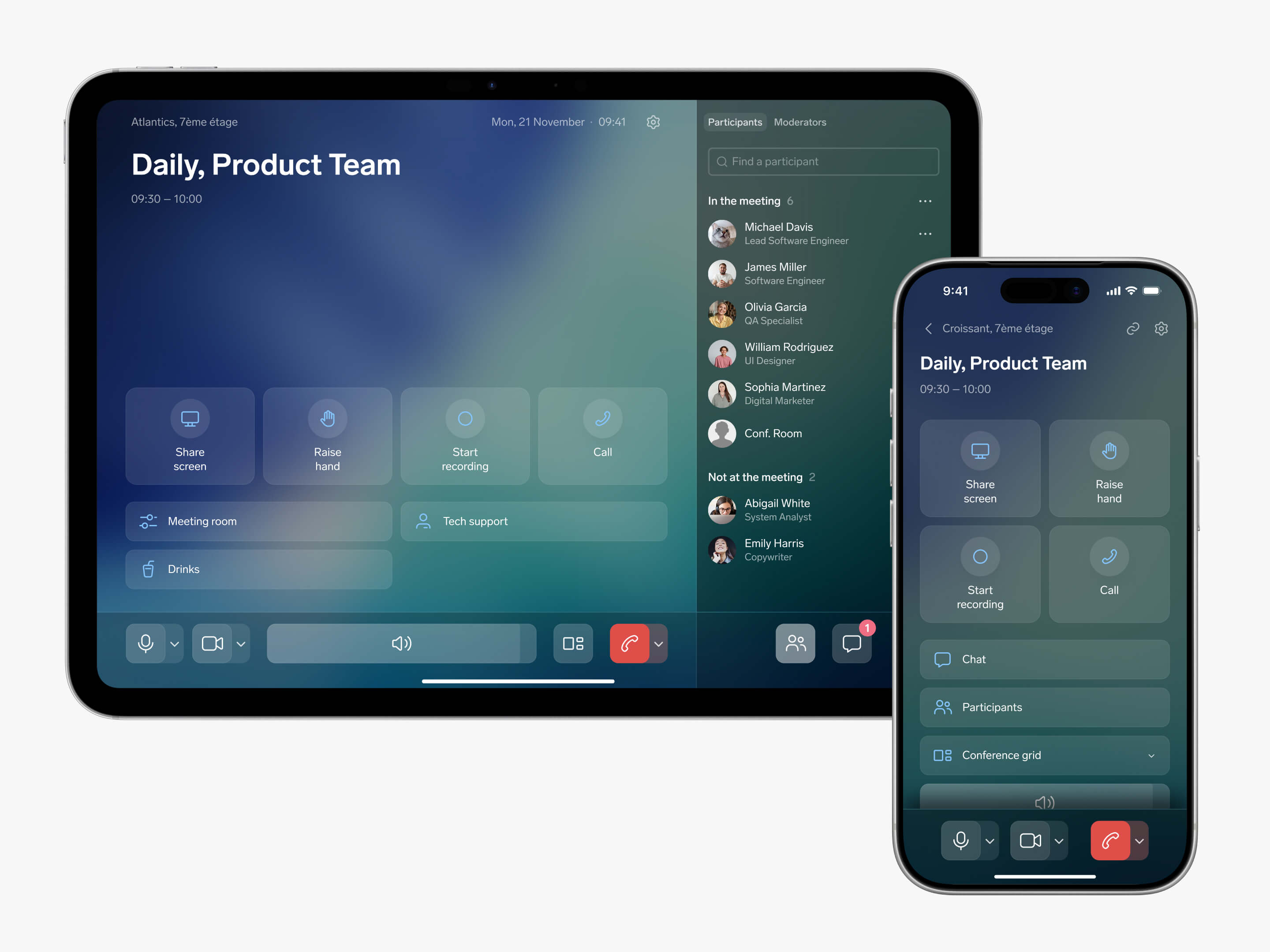
New Controllers Interface
I redesigned the interface of in-room meeting controllers. I made newly added features more visible, simplified access to existing controls, and brought participants and chat directly to the main screen.
Meeting Room Booking Management
I added a set of features that help companies optimize the use of their meeting rooms: booking confirmation, automatic cancellation for no-show meetings, and early checkout when a room becomes available ahead of schedule.
Together, these features clear “dead” bookings from the calendar and make rooms available again. Around 300K bookings are canceled automatically each year, freeing up roughly 150K hours of meeting room time for our clients and reducing the need to expand office infrastructure.
Mass Kiosk Configuration
I added bulk kiosk configuration to the admin panel, making it possible to update settings across multiple meeting rooms at once. This reduced the manual work needed to launch new rooms or roll out configuration updates.
Kiosk Grouping
I added kiosk grouping in the admin panel so companies with a large number of meeting rooms could manage their infrastructure more easily. Administrators can group rooms by city, office, floor, or other attributes to find the right kiosks faster and apply settings to a specific group.